WhatsApp Automation for UAE Businesses: What to Automate First
CPBy the CloudFigma Pulse team· Updated
The short answer
WhatsApp automation is the use of software to send messages, answer common questions and run workflows on WhatsApp without typing every reply. UAE businesses can start free with the WhatsApp Business app’s automatic replies. When they need reminders, chatbots or a shared team inbox, they move to the paid WhatsApp Business Platform (API).
Key facts
This guide covers how each method works, which one suits you, what to automate first, what it costs and how to start.
- The WhatsApp Business app offers free automatic replies: a greeting message, an away message and quick replies.
- The WhatsApp Business Platform (API) costs Meta’s rate per message plus a provider’s fee, and it supports reminders, chatbots and a shared team inbox.
- Moving a number to the API normally removes it from the app, although Meta’s coexistence option lets some providers connect the same number to both.
- Broadcast lists in the app reach only people who have saved your number, while API campaigns go to opted-in customers.
- UAE businesses should first automate support answers, lead qualification, order updates and reminders, starting with just one flow.
- For UAE businesses, Pulse costs ₹15,000 a year with taxes included (about AED 570), billed in rupees.
What is WhatsApp automation and how does it work?
Automation runs in one of two places: the tools built into the WhatsApp Business app, or the WhatsApp Business Platform (API). The app saves typing, while the API lets your own systems send messages by themselves.
The app suits one phone and a modest volume of chats. Its greeting message, away message and quick replies cover the repetitive start of a conversation, and you handle the rest yourself.
The API lets your website, store or app send messages by itself, for example when a booking is made. It powers reminders, confirmations, keyword replies and a shared inbox where your whole team answers from one number.
WhatsApp Channels are a separate, one-way tool for posting updates to followers. They suit announcements, but they are not automated conversations with individual customers.
| Method | Where it runs | Best for |
|---|---|---|
| WhatsApp Business app | On your phone and linked devices | One phone, modest chat volume |
| WhatsApp Business Platform (API) | Connected to your website, store or booking system | Reminders, confirmations, team inbox |
A worked example: how a Dubai brokerage handles a property enquiry
A buyer enquires about a listing, and the first reply, the viewing confirmation and the reminder all go out without anyone typing:
Hi, is the two-bedroom in Dubai Marina still available?
Thanks for your enquiry. Yes, it is available. How can we help?
Book a viewing
Hi Omar, your property viewing with Harbour Lane Homes is confirmed for Saturday at 5:00 PM.
Hi Omar, this is a reminder of your property viewing tomorrow at 5:00 PM.
Reschedule
Of course, Omar. Your viewing is now at 6:00 PM on Saturday.
Example conversation.
Sample viewing confirmation and reminder templates
Sample wording for both templates is below, and your booking system fills in the words in square brackets. Ask a native Arabic speaker to review the text before you submit it. Our guide to Arabic WhatsApp templates for UAE businesses covers approval and Ramadan timing.
Each template carries two buttons: Get directions and Reschedule on the confirmation, Confirm and Reschedule on the reminder. The software handles the predictable messages, and your agents handle the replies that need judgement.
| Message | English | Arabic |
|---|---|---|
| Confirmation | Hi [name], your property viewing with [agency name] is confirmed for [day] at [time]. Use the buttons below if you need directions or a new time. | مرحباً [الاسم]، تم تأكيد موعد معاينة العقار مع [اسم الوكالة] يوم [اليوم] الساعة [الوقت]. استخدم الأزرار أدناه للحصول على الاتجاهات أو لتغيير الموعد. |
| Reminder | Hi [name], this is a reminder of your property viewing with [agency name] tomorrow at [time]. Please confirm or choose a new time using the buttons below. | مرحباً [الاسم]، نذكّرك بموعد معاينة العقار مع [اسم الوكالة] غداً الساعة [الوقت]. يرجى التأكيد أو اختيار موعد جديد باستخدام الأزرار أدناه. |
Which type of WhatsApp is best for your business?
A UAE business meets three options: personal WhatsApp, the WhatsApp Business app and the WhatsApp Business Platform. Personal WhatsApp is not built for business use, so the real choice is between the other two. The table below summarises our app vs API guide.
The broadcast row matters more than it looks. Broadcast lists skip anyone who has not saved your number, so they can quietly shrink your audience. Our note on marketing message limits explains other reasons messages go undelivered.
| Feature | WhatsApp Business app | WhatsApp Business Platform (API) |
|---|---|---|
| Cost | Free | Meta’s rate per message, plus a provider’s fee |
| Who replies? | You, on your phone and linked devices | Your whole team, from a shared inbox |
| Messages you start | Only to people in your contacts | Approved templates to anyone who opted in |
| Sending to many people | Broadcast lists that reach only those who saved your number | Campaigns to every opted-in customer, with delivery per person |
| Automatic replies | A greeting, an away message and quick replies | Keyword replies, reminders, follow-ups and your own software |
| Your software | No connection | Order updates and one-time passwords through the API |
| Number | Moves to the API, unless your provider offers Meta’s coexistence option | A new number avoids interruption |
When should you move from the app to the API?
Plan your number before you switch. Moving your current number to the API normally removes it from the app first, unless your provider offers Meta’s coexistence option. Chats already on the phone stay on the phone. A new number avoids the interruption, and many businesses keep the app on their old number for personal contacts.
Most businesses move from the app to the API when one of these becomes true:
- More than one person needs to reply from the business number.
- Customers miss appointments because nobody had time to remind them.
- Questions arrive at night and on days off, and wait until morning.
- You want to send updates or offers to customers who have not saved your number.
- Your website, store or app should send messages by itself.
What should a UAE business automate first?
Start with the messages you already send or answer repeatedly, in this order: support answers, lead qualification, order updates and reminders. Each removes typing without removing the person from the conversation. The examples below show how a flow can work.
Pick one of these, not all four. A single working flow is easier to test and easier for your team to trust. It should always leave a clear route to a person.
Tap your business to see its first flow
Customer support: answer the questions you get every day. A Dubai clinic can reply automatically with its address and hours, then pass anything about symptoms to a staff member. See how this looks for clinics.
Anything about symptoms goes to a staff member.
Are you open tomorrow morning?
Yes, Sunrise Clinic opens at 9:00 AM tomorrow.
Lead generation: qualify enquiries before you call back. An Abu Dhabi property enquiry can trigger two questions: budget in AED and preferred area. Our page for real estate teams shows this kind of flow.
The agent opens the chat with both answers.
E-commerce and sales: orders and delivery updates. A Sharjah shop can confirm an order, send a delivery update and share items from its catalogue on request.
Questions about an order go to your team.
Reminders: appointments, bookings and seasonal hours. A Dubai restaurant can confirm a booking with “your table for 4 at Spice Garden is confirmed for Saturday at 8 PM”. The same flow can later announce changed Ramadan hours, as our restaurants page shows.
The same flow can announce Ramadan hours later.
Is WhatsApp Business automation free?
Partly: the WhatsApp Business app is free and the API is paid.
The app’s greeting message, away message and quick replies cost nothing. They cover first contact, out-of-hours notices and repeated answers such as opening hours. The app allows up to 50 quick replies, which is plenty for most small teams, and WhatsApp’s quick replies help page explains how to save them.
The app has no connection to your own software, so it cannot send a reminder when a booking is made.
A free WhatsApp chatbot usually means the app’s built-in replies, or a provider’s free tier with tight limits. These handle fixed questions well but rarely cover reminders or several agents on one number.
Be careful with “free” AI bots that drive the standard app through browser scripts or extensions. They are neither the app’s built-in tools nor the API, and your number is the asset at stake. Whichever route you choose, make the bot hand every question it cannot answer to a named team member.
What the API costs and who charges it
The API has two costs: Meta’s rate per message and your provider’s fee. Meta’s published UAE list rates, checked on 7 November 2026, are AED 0.2115 per marketing message and AED 0.0576 per utility or authentication message.
Each business number also gets 1,000 free service messages a month, then pays AED 0.0576 each. So 1,000 offers cost about AED 211.50, and 1,000 booking reminders about AED 57.60. Rates can change, so check them before you budget. Then ask each provider exactly how its fee works:
- Do you pass on Meta’s rate per message at cost, or add a markup?
- Is there a monthly platform fee, and what does it include?
- Is setup help included, or charged separately?
- What are the renewal and cancellation terms once any trial ends?
What rules apply to automated WhatsApp messages in the UAE?
On the official platform, messages you start must use approved templates and go only to people who opted in. UAE law applies as well. Cabinet Resolution No. 56 of 2024 regulates telemarketing by companies licensed in the UAE, including free zones. Its definition covers marketing messages sent through social media applications.
This section is general guidance, not legal advice. Confirm how each rule applies with your licensing authority before you launch.
The 24-hour customer service window opens when a customer messages you. Inside it you can reply freely; outside it, you need an approved template. WhatsApp’s policy allows automated replies in that window, but you must also offer a prompt, clear route to a person.
The resolution requires prior approval for phone marketing and limits marketing calls to 9:00 am to 6:00 pm. Ask your licensing authority how both apply to your WhatsApp campaigns. Take legal advice if your messages touch regulated areas.
- Consent first. The WhatsApp Business Messaging Policy requires opt-in permission before you message someone. TDRA, the UAE telecoms and digital regulator, says marketing messages need prior explicit consent. Record when and how each person agreed.
- A clear way to stop. WhatsApp’s policy says you must respect every request to block, stop or opt out. TDRA says every marketing message should include a free unsubscribe option. The resolution also bars companies from contacting numbers on the national Do Not Call Register.
- Marketing: how it differs from service messages. An offer and an order update are different jobs. Our guide to WhatsApp template categories explains marketing, utility and authentication templates.
How do you start with WhatsApp automation? A step-by-step tutorial
Start with one repeatable task, confirm the free app cannot handle it, then build a single tested flow on the official WhatsApp Business Platform. These seven steps take you to your first automated flow:
- Step 1: pick one task to automate. Choose something your team repeats daily, such as confirming a booking, and note which system holds the data.
- Step 2: check whether the app is enough. Greeting, away and quick replies may cover simple needs. Reminders, chatbots or a shared inbox need the API.
- Step 3: prepare your business details. Your provider will tell you what verification Meta asks for.
- Step 4: choose your number. Decide whether to move your current number or use a new one, following the number rule above.
- Step 5: get message templates approved. A clinic template might read: “Hi Aisha, your appointment at Sunrise Clinic is confirmed for Saturday 14 November at 10:30 AM.”
- Step 6: connect a provider and a webhook. A webhook lets your booking or store system tell the platform when something happens, such as a new order. The right message then goes out by itself.
- Step 7: build one flow, test it, then expand. Send it to your own phone first and check the wording and the handover. Then add the next use case.
Ready to move from the app to the API?
Tick what is true. If most of these are ticked, you are ready to compare providers and plan your first flow.
- I have named one task to automate first, such as a booking confirmation or reminder.
- I know which website, store or app will trigger the messages.
- I have decided whether to move my current number or use a new one.
- I know whether my number will move to the API or stay on both, as our step-by-step API setup guide explains the move.
- I know that phone chats stay on the phone, and that our mobile app handles new ones.
- I have a plan to tell customers if the number changes.
- I have drafted the wording for my first message template.
- I have asked for Meta’s per-message rate and my provider’s fee in writing.
- I have a person ready to take over when the automation cannot answer.
What mistakes should you avoid with WhatsApp automation?
The four most common mistakes each have a safer route:
- Unofficial extensions or scripts on the standard app. Use the app’s built-in tools or the official API instead.
- Messaging contacts who never opted in. For wider campaigns, send approved templates to opted-in customers through the API.
- Automating everything. Give customers a clear way to reach a person, and route complex questions to your team.
- Switching numbers without a plan. Tell customers in advance, and remember that phone chats do not move into the API inbox.
Where does CloudFigma Pulse fit in?
CloudFigma Pulse is a WhatsApp Business API service built for the point where the free app stops being enough. It serves businesses in Dubai, Abu Dhabi and Sharjah.
Pricing is published, not hidden. For UAE businesses, Pulse costs ₹15,000 a year with taxes included (about AED 570), billed in rupees, and guided setup is included. Pulse adds nothing per message, because Meta bills messages to your own card at its own rate.
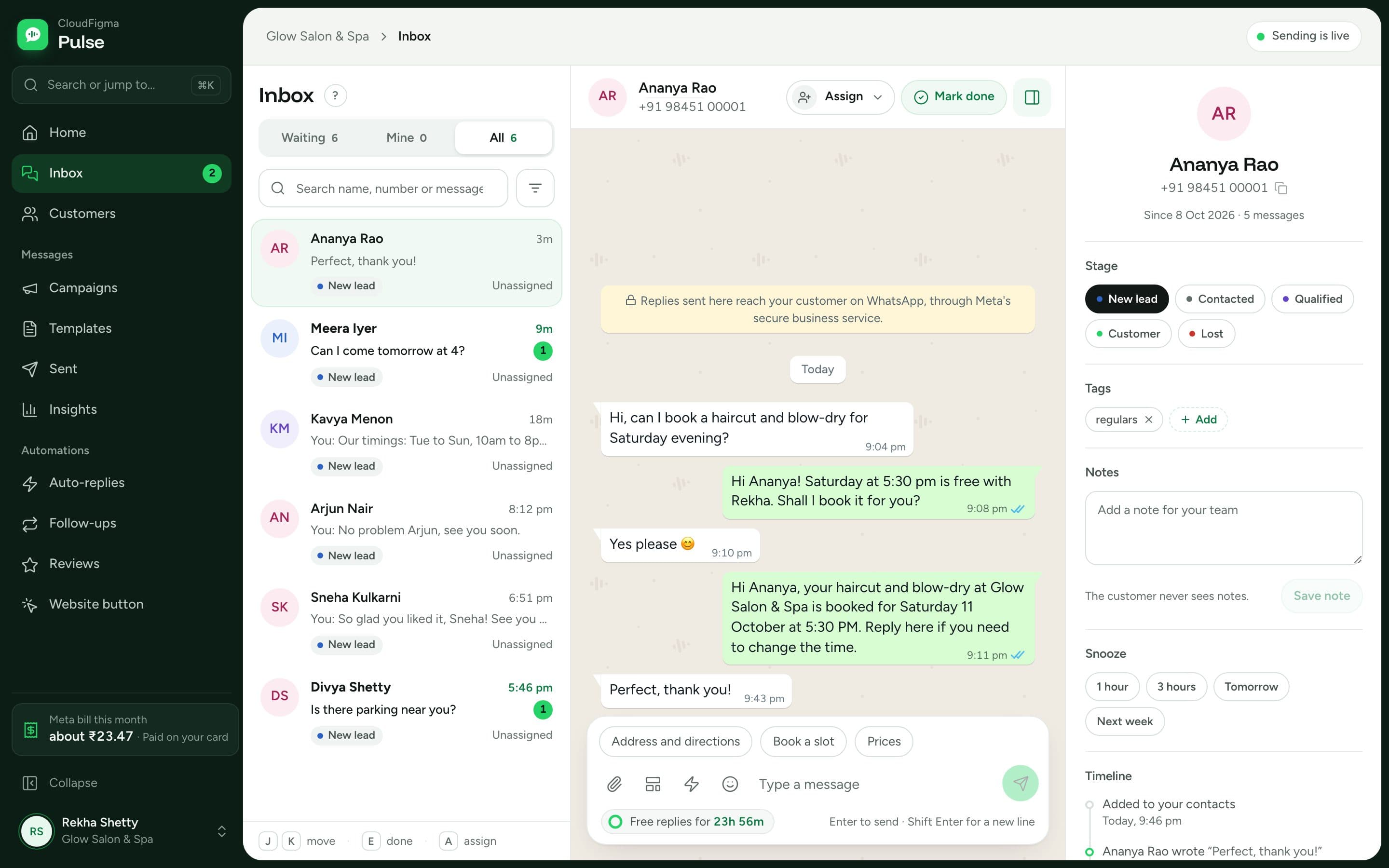
- A shared inbox, so your whole team replies from one business number.
- Automatic replies and workflows: keyword replies, reminders and follow-ups, plus order updates and one-time passwords sent by your own software.
- Campaigns to opted-in customers, with per-person delivery.
- Ready templates by industry, such as appointment confirmations for clinics and table confirmations for restaurants.
How can CloudFigma Pulse help you start?
Pulse has ready setups for real estate teams, clinics and restaurants. Shops, salons and schools are covered too. Our WhatsApp Business API page explains the service in more detail.
If you have one flow in mind, such as a booking reminder, we can talk it through with you.
Sources
Checked on 7 November 2026.
- UAE Cabinet Resolution No. 56 of 2024 on telemarketing (scope, consent channel, Do Not Call Register, calling hours)
- TDRA frequently asked questions (consent and unsubscribing for marketing messages)
- WhatsApp Business Messaging Policy (opt-in, opt-out and automation rules)
- WhatsApp Business Platform pricing (UAE rates in AED by category)
- Pricing on the WhatsApp Business Platform (per-message billing and the free service messages)
- WhatsApp Help: how to use quick replies (limit of 50 saved replies)
- Onboard WhatsApp Business app users, Meta for Developers (using one number on the app and the API)
- Pulse: WhatsApp Business API in Dubai and the UAE (UAE pricing)
- Pulse pricing (pricing and Meta billing)
- WhatsApp Business app vs API: which does your business need? (comparison table, when to move)
- WhatsApp Business API for clinics (appointment template example)
Questions people ask
Can I create a free WhatsApp chatbot?
Yes, in a limited form. The app’s free automatic replies handle simple, repeatable answers. A chatbot that asks questions or connects to your booking system needs the paid API.
Is there a free AI chatbot for WhatsApp?
Not one we can point to as fully free and official. Treat tools that automate the standard app through scripts or extensions with caution. The safe options are the app’s built-in tools or the official API.
Can I send WhatsApp broadcasts for my business?
Yes. App broadcast lists reach only people who saved your number, while API templates reach every opted-in customer. If you send reminders or offers every week, the API is usually the better fit.
Can I automate WhatsApp messages without the API?
Only to a basic degree. The app handles first contact and common answers. System-triggered reminders, chatbot flows and a shared inbox need the API.